
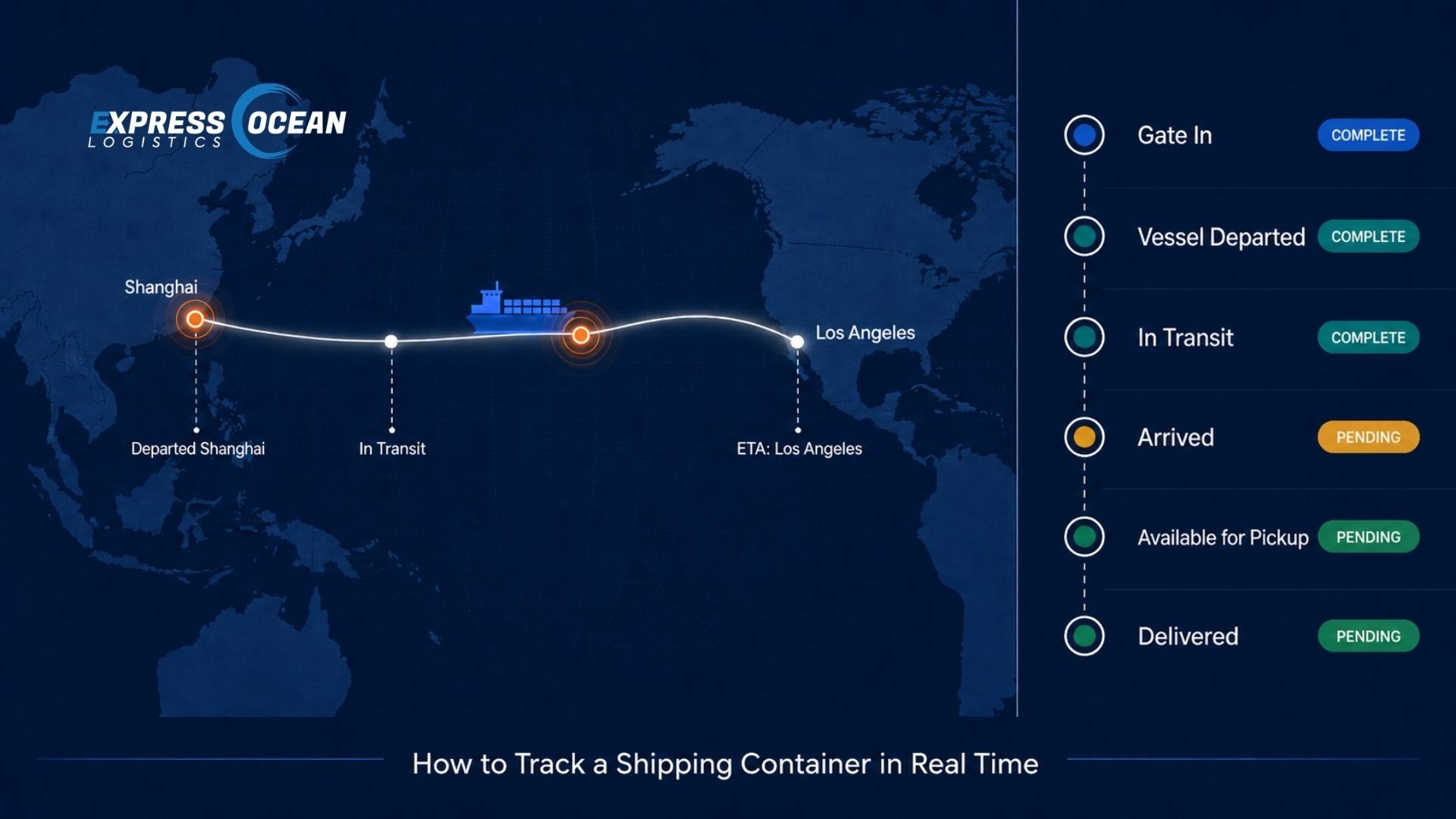
To track a shipping container in real time, you need your container number, Bill of Lading number, or booking reference. Enter one of these into your freight forwarder's digital platform, the carrier's tracking portal, or a third-party tracking tool. The system returns live milestone events from the carrier's operations combined with AIS vessel position data showing where the ship currently sits on the ocean, its speed, and its updated ETA. For US importers, real-time tracking also connects to customs clearance status, demurrage timelines, and delivery scheduling.
Knowing where your cargo is at any point during an ocean freight transit is not a luxury. It is a basic operational requirement for any business that depends on imported goods to fill orders, maintain inventory levels, or meet delivery commitments to customers. A container that goes untracked between vessel departure and port arrival is a supply chain risk that compounds: late deliveries, missed warehouse appointments, unnecessary demurrage charges, and customer service failures all trace back to visibility gaps.
This guide explains exactly how container tracking works, what information you need, how to read every milestone event your tracking system shows, and what to do when your tracking data indicates a problem. It is written from 20 years of operational experience managing ocean freight for US importers at Express Ocean Logistics.
What You Need to Track Your Container
Every container tracking system requires at least one reference number to locate your shipment. Your freight forwarder issues or provides all three of the following as standard documentation for every ocean freight booking.
A unique code printed on every shipping container. Formatted as 4 letters followed by 7 digits, where the first 3 letters identify the owner, the 4th is always U (for unit), and the 6 digits plus a check digit complete the code.
MSCU 123456 7The legal title document for your cargo. Issued by your NVOCC freight forwarder (House Bill of Lading) or directly by the ocean carrier (Master Bill of Lading). Contains the shipment route, consignee, and cargo description.
EOLU123456789The confirmation number issued by the carrier or NVOCC when container space is booked. Used during the pre-departure window before the Bill of Lading is finalized and issued to the shipper.
SHBK-2025-0491How Real-Time Container Tracking Works
Real-time container tracking combines two distinct data sources. The first is the carrier's operational milestone system, which records specific events as the container physically moves through the supply chain. The second is AIS, the Automatic Identification System, which broadcasts the live position of the vessel carrying your container.
Carrier milestone data
Every time your container reaches a significant operational event, the carrier's system records it: gate in at the origin terminal, loading onto the vessel, vessel departure, vessel arrival, discharge from the vessel, and terminal availability after customs release. These events are transmitted to tracking platforms via carrier APIs, typically with a delay of a few hours between the actual event and its appearance in the tracking system. Milestone data is the most operationally reliable form of tracking because it comes directly from the carrier's port operations records.
AIS vessel tracking
AIS (Automatic Identification System) is the live position tracking layer. All commercial ocean vessels above 300 gross tons are required by the International Maritime Organization to broadcast their identity, position, speed, and heading via AIS transponders. Shore stations and satellites receive these broadcasts continuously, and tracking platforms aggregate the data to show the vessel's current position on a live map. AIS data allows tracking systems to calculate predictive ETA updates based on actual vessel speed and position rather than the carrier's static scheduled arrival time.
The combination of carrier milestone data and AIS position data gives you two distinct answers to two different questions. Milestone data tells you what has happened to your container. AIS data tells you where the vessel is right now and when it is likely to arrive. Both are necessary for meaningful supply chain visibility.
How to Track Your Container: Step by Step
Your freight forwarder sends your House Bill of Lading and container number as part of the shipping documentation package, usually within 24 to 48 hours of vessel departure. If you have not received these, contact your forwarder directly. Do not attempt to track using your purchase order number or supplier invoice, as these are not recognized identifiers in any carrier tracking system.
The most reliable tracking experience for any ocean freight shipment comes from your freight forwarder's own platform, not a third-party tool. Your forwarder has direct access to the carrier API, your specific shipment records, and the context to interpret tracking events against your delivery timeline. At Express Ocean Logistics, clients track all shipments through our digital freight platform, which provides live milestone updates, vessel position, customs status, and delivery scheduling in a single view without needing to check multiple carrier portals.
Type your container number, Bill of Lading number, or booking reference into the search field. Some tracking platforms ask you to select the shipping line (Maersk, MSC, CMA CGM, COSCO, etc.) to narrow results faster. If you are unsure which carrier your forwarder booked, your House Bill of Lading or the shipping confirmation email will specify the vessel operator.
The tracking result shows your container's last recorded milestone event and the current ETA at the destination port. The milestone tells you the container's operational status. The ETA tells you when the vessel is expected to arrive at the discharge port based on current AIS position and speed. Both pieces of information feed your downstream planning: warehouse receiving appointments, drayage scheduling, and customer delivery commitments.
Most tracking platforms allow you to subscribe to automatic notifications when key milestones occur. The most operationally important ones for US importers are: vessel departed origin port (triggers ISF deadline if not already filed), vessel arrived destination port (starts free time window and demurrage clock), and container available for pickup (CBP has released the cargo). Set notifications for all three so you can act immediately rather than checking manually.
Container Tracking Milestones Explained
Every tracking event your platform shows corresponds to a specific physical or administrative action in your container's journey. Knowing what each one means tells you not just where your cargo is, but what should happen next and whether your timeline is on track.
| Milestone Event | Where it happens | What it means for you | Status |
|---|---|---|---|
| Empty Released | Origin depot or port | Carrier has issued an empty container to your supplier for loading. Cargo stuffing can begin. | Pre-shipment |
| Gate In | Origin port terminal | Loaded container has arrived at the origin port terminal and checked in. It is now in the carrier's custody. | Pre-vessel |
| Loaded on Vessel | Origin port terminal | Container has been physically lifted onto the vessel. Your ISF filing must have been submitted before this point. | Pre-vessel |
| Vessel Departed | Origin port | The ship has left the origin port. Ocean transit time begins. ETA at destination port is now firm from the carrier. | In Transit |
| Transshipment (if applicable) | Hub port (e.g. Busan, Singapore) | Container transferred to a second vessel at an intermediate hub. Adds 1 to 4 days and one additional risk point to the transit. | In Transit |
| Vessel Arrived | Destination port | Ship has arrived and is awaiting berth or has berthed. Terminal free time clock starts from discharge date, not arrival date. | At Port |
| Discharged from Vessel | Destination terminal | Container has been unloaded from the ship. Terminal free time window begins. Your customs broker should file the entry immediately if not pre-filed. | At Port |
| Available for Pickup | Destination terminal | CBP has released the container. The terminal has processed it and it is ready for drayage pickup. Schedule your truck immediately to stay within free time. | Released |
| Gate Out Full | Destination terminal | Container has left the terminal on a drayage truck. Heading to your warehouse or delivery address. Carrier detention clock starts from this point. | In Delivery |
| Empty Returned | Carrier depot or terminal | You have unloaded your cargo and returned the empty container to the carrier. Detention charges stop accruing. Shipment is fully complete. | Complete |
Container Tracking and US Customs Clearance
Standard container tracking platforms show port and vessel milestones, but they do not show CBP customs clearance status. Customs clearance is a parallel process that runs on CBP's own system, ACE (Automated Commercial Environment), and is only accessible to licensed customs brokers who have filed your entry.
For US importers, the connection between tracking and customs is critical because your container cannot be picked up from the terminal until CBP issues a cargo release. Here is how the two systems interact during a standard import clearance.
- Before vessel departure: Your customs broker files the ISF 10+2 with CBP. This is a tracking event in itself; a missing or late ISF can cause your container to be flagged for examination before it even arrives at a US port.
- Before vessel arrival: Your customs broker pre-files your formal entry in ACE. Pre-filing is the most reliable way to ensure CBP can process your entry immediately after discharge, minimizing the gap between the "Discharged" milestone and the "Available for Pickup" milestone.
- After discharge: CBP reviews your entry. A clean, accurate entry with matching documentation clears in 1 to 2 business days. An exam or documentation hold adds time and runs against your free time window simultaneously.
- After CBP release: Your broker receives an electronic release in ACE and notifies your freight forwarder. The terminal system is updated to "Available for Pickup" and your drayage appointment can be confirmed.
When your freight forwarder also provides customs brokerage, these two parallel information streams are combined into a single view. You do not need to check a carrier tracking portal for milestone data and call your broker separately for customs status. Everything appears in one system, managed by one team. This is one of the core operational advantages that US importers gain by working with an international freight forwarding company that handles ocean freight and customs under one roof.
For importers who want to understand the most common reasons CBP holds containers and how to prevent them, a detailed breakdown is available in our guide on avoiding US customs delays.
How Tracking Data Protects You from Demurrage Charges
Demurrage and detention are two of the most avoidable costs in ocean freight import operations, and real-time tracking is your primary tool for preventing them.
Demurrage is charged by the port terminal when a container sits on their yard beyond the free time window after discharge. It accrues per container per day and compounds quickly, particularly at congested ports like Los Angeles and New York/NJ during peak season.
Detention is charged by the shipping line when you hold a container beyond the carrier's free time after it leaves the terminal. The clock starts from "Gate Out Full" and stops when you return the empty container.
Both charges are triggered by delays in your response to tracking milestones. An importer who knows the moment their container is available for pickup and has a drayage appointment already scheduled will pick up the container within free time. An importer who finds out the container was available two days after the fact is already accruing demurrage.
Proactive tracking, combined with pre-scheduled drayage based on the vessel's ETA, is the practical solution. When the tracking system shows "Vessel Arrived," the drayage appointment should already be tentatively scheduled. When "Available for Pickup" appears, the appointment is confirmed and the truck moves. This sequence eliminates the response lag that causes demurrage charges for most US importers.
What to Do When Tracking Stops Updating
Every importer eventually encounters a shipment where tracking data goes silent for longer than expected. Before escalating, it helps to understand the most common reasons and the right response to each.
- 1Vessel is in open ocean with limited satellite AIS coverage
Position updates slow to 30 to 90-minute intervals in some Pacific Ocean zones. This is normal and does not indicate a problem. The milestone events (departed, in transit) will still be accurate. Check the last known AIS position against the expected route and calculate whether the ETA is still on track.
- 2Carrier has a data lag on milestone events
Some carriers update their tracking APIs with a 12 to 24-hour lag behind actual port events. If the vessel has arrived according to the carrier schedule but the tracking platform still shows "In Transit," the discharge milestone may simply not have been transmitted yet. Wait 24 hours before escalating.
- 3Container is awaiting a CBP exam or hold
After discharge, some containers enter a CBP examination queue and do not move to the "Available for Pickup" status for several days. This does not appear in carrier tracking systems. Contact your customs broker directly to check the CBP status of your entry in ACE. Your broker will know immediately if there is a hold and what documentation CBP has requested.
- 4Vessel has been rolled to a later sailing
Container rollings, where a container is bumped from a booked vessel to the next sailing due to space constraints or cutoff violations, cause a gap in tracking where the container is physically at the origin port terminal but no new vessel milestone appears. Your freight forwarder will receive a rolling notification from the carrier and should proactively inform you. If tracking has not updated for more than 48 hours after the expected vessel departure, contact your forwarder first.
- 5Wrong reference number entered
Tracking returns no results or outdated results when the reference number entered does not match the carrier's system exactly. Container numbers are case-sensitive and must include the check digit. Bill of Lading numbers must be entered exactly as they appear on the document, without spaces. Verify the reference number character by character against your shipping documents before escalating.
What AIS Data Tells You Beyond Position
AIS provides more than just a dot on a map. For importers actively managing delivery timelines, the supporting data fields in AIS transmissions offer useful signals about whether your vessel is on schedule.
Speed over ground (SOG) is the vessel's current speed in knots. A vessel running at 16 to 20 knots on a transpacific route is operating at normal cruising speed. A vessel running significantly below that may be experiencing weather, mechanical issues, or deliberate slow steaming to conserve fuel. Slow steaming can shift your ETA by several days on a long transpacific route.
Destination and ETA fields in AIS are manually entered by the vessel's bridge crew and may not be updated in real time. Do not rely on the AIS-transmitted ETA field as an authoritative arrival estimate. Use the predictive ETA calculated by your tracking platform from actual position and speed data instead.
Vessel draught indicates how deeply the ship is sitting in the water, which correlates with how fully loaded the vessel is. This is not directly relevant to your individual container but is useful context when assessing whether a vessel might be making additional port calls or running on an altered schedule.
Tracking FCL vs LCL Shipments
FCL and LCL shipments are tracked differently because of how they are structured.
An FCL container is assigned a unique container number that is yours for the entire journey. You can track it by container number from gate-in at the origin terminal through empty return at the destination, with full milestone visibility at every stage. The container number on your Bill of Lading is the same container number you track. There is no ambiguity.
An LCL shipment sits inside a larger FCL container shared with other shippers' cargo. The container number your goods travel in is the master container number, which may or may not appear on your House Bill of Lading depending on how your forwarder structures the documentation. You typically track an LCL shipment by your House Bill of Lading number, which your forwarder links to the master container. Your tracking milestones will show vessel events accurately, but you will also see additional events for consolidation at the origin CFS and deconsolidation at the destination CFS, which add 3 to 7 days to the total transit compared to FCL.
Understanding the full operational difference between these two shipping modes is useful before your next shipment decision. The complete FCL process, including how containers move from origin through US Customs to your door, is covered in our guide on FCL ocean freight for US businesses.
Shipment Visibility Through Express Ocean Logistics
Express Ocean Logistics provides real-time shipment tracking for every ocean freight, air freight, and customs clearance we manage for US importers. Our platform aggregates carrier milestone data and AIS vessel position into a single dashboard, so you are not switching between carrier portals, broker emails, and drayage confirmations to piece together where your cargo stands.
Every client receives milestone notifications automatically at the key events that matter operationally: vessel departure from origin, vessel arrival at destination port, CBP customs release, and container availability for pickup. Proactive updates mean you act on information immediately rather than discovering a delay after it has already cost you free time.
Because we manage both the ocean freight and the customs brokerage in-house, your customs clearance status updates appear alongside your container tracking milestones. For importers who have experienced the frustration of a container sitting at port while waiting for a broker to respond to a CBP query, this integration is a meaningful operational difference. As a freight forwarder in New Jersey, our team is positioned within easy reach of the Port of New York and New Jersey, one of the busiest import gateways on the East Coast, which supports faster on-the-ground response when any container needs attention.
For importers planning their first ocean freight shipment and wanting to understand the full sequence of events before cargo is even booked, our operational walkthrough on shipping by ocean freight for the first time covers every stage from booking confirmation through final delivery.
Frequently Asked Questions About Container Tracking
These are the questions US importers ask most often about tracking shipping containers in real time.
How do I track a shipping container in real time?
What information do I need to track my shipping container?
What do container tracking milestones mean?
What is AIS and how does it help track shipping containers?
Why is my container tracking not updating?
Does real-time tracking tell me when my container will clear customs?
Track Every Shipment Without Chasing Updates
Express Ocean Logistics gives clients real-time container tracking, customs clearance status, and delivery coordination in one platform, managed by one team from origin to door.
See Our Tracking Platform